IDA-Style Highlighting in VS Code
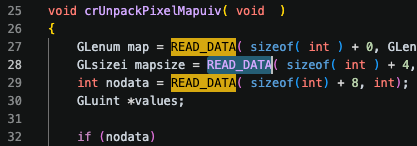
As I work through Zero Day Engineering training, I have been spending more time reading large open-source codebases from a vulnerability-research perspective.
One small thing I kept missing from IDA Pro is the highlight feature: select a token, and instantly see the other matching occurrences nearby. It is simple, but very useful when trying to understand data flow, control flow, and repeated use of variables or fields.
VS Code has some built-in behavior around selection highlighting, but I found it inconvenient for this workflow. I wanted something closer to IDA: automatic, whole-word matching and visually obvious.
I found a useful extension, highlight-selection, which was almost exactly what I needed. Since it was open source, I forked it, made the small changes I wanted, tested it locally in VSCodium, and opened a pull request upstream.
The result is a small quality-of-life improvement: IDA-like selected-word highlighting, but inside my regular source-code editor.
Feel free to drop a comment on the LinkedIn post for this article.